
Most companies don't succeed because of good docs, they succeed despite bad docs: bad docs are the norm.
But bad docs are also unacceptable.
They slow down users, increase support load, and make your product hard to discover.
Today, I'll share how we write docs at Replit.
We overhauled our docs in 3 months, 10x'ing internal contributors and 2x'ing monthly views.
But the real win was getting our docs integrated directly into the product. Replit Agent now uses our docs to advise users.
Soon, more agents than humans will use your tool. How will they find you? How will they be successful?
This post covers 8 rules for writing docs with agents and for agents. 1
- Write for humans, optimize for agents
- Start with a funnel
- Use Diataxis to scaffold
- Write with AI, build for agents
- Offload to background agents
- Automate quality with CI
- Automate scaffolding and routine
- Make contribution easy and visible
Write for humans, optimize for agents
Many have said "the future of the web is agents," but what does that mean for docs?
Perhaps unsurprisingly: agents need great docs the same way humans do.
Our first rule: write clear docs for humans and agents benefit automatically.
Best practices work for both:
- Use logical structure with clear connections2
- Don't lock critical information in images, write it out
- Remove outdated content (even hidden pages show up in search and
llms.txt) - Use clear headings, examples, and context
- Write well: sentences, paragraphs, and sections should be clear and easy to understand.
From there, you can start to optimize for agents:
- Add
llms.txtandllms-full.txtto make your docs discoverable - Create an MCP server3 for your docs to help agents understand your product
- Build agents into your onboarding and maybe even an install command
Start with a funnel
Design the path from landing to "aha," that means treating docs like a product funnel.
Ask "How does a new user see your docs? Can they find what they need? Is it obvious how to get started?"
Think about what developers want: why are they here? What should they see first?
The docs funnel:
- What is your thing, and why should I care?
- How do I get started quickly?
- How do I learn more?
This starts with a great landing page, a rapid quickstart, and guided next steps.
Landing page
Answer "what" and "why" as directly as possible.
Users visit your docs for one thing: how does this tool help me achieve my goal?
Use brief descriptions and be sure to list common use cases. Avoid marketing speak: if users are already reading your docs, the goal is to help them achieve their goal.
Quickstart
Can you get someone started with one command?
Developer tooling has improved alongside (and thanks to) AI.
We have better sandboxes, resources, and infra. There's no excuse for not having a rapid quickstart where users can get started immediately or simplifying the install process as much as possible4
Next steps
Where should users go next? What is the next step in learning your product, and why should they continue?
Once you have a clear path, you can start to use Diataxis to scaffold your docs.
Use Diataxis to scaffold
Diataxis is a way of thinking about docs built on four content types: Tutorials, How-tos, Reference, Explanations.
- Tutorials: How do I build X from scratch?
- How-tos: How do I do Y right now?
- Reference: What does Z support?
- Explanations: Why does this work this way?
Diataxis is a tool, not a rulebook. Your docs depend on your product and audience—always ask yourself who you're writing for and what you're writing about.
You will find exceptions to the framework. That's a good sign—it means you're writing for your product and audience, not because someone told you to.
If your product is complex, break it into primitives and build from the user's view.
For example, take Replit.
Replit lets you build Apps using Replit Agent, which lives in the Workspace.
The primitives are Replit, Agent, Workspace, and Apps. These become sections in your reference material. Then you add subsections and details.
Structure, organization, and planning matter for you, your team, and AI.
Docs overhaul
If you've gotten this far, you might be thinking about a docs overhaul.
An overhaul needs up-front work. Balance structure and writing, but do both in parallel—don't let an overhaul stop you from shipping.
A good way of doing this is assigning priorities and actions to each page.
What's p0? What's p1? What's p2? Will we delete this page? Will we rewrite it? Will we move it?
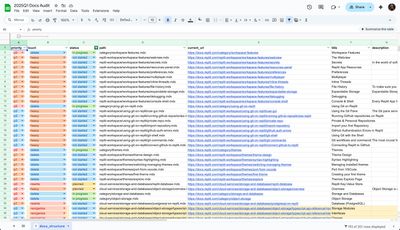
Ask yourself:
- What's the state of the docs?
- What's the goal?
Take our situation:
- Docs debt from a pivot, wrong audience
- Rewrite consumer docs, fix tone and voice
Once you know your goals, pick a pattern and start writing!
Write with AI, build for agents
You should use AI to write docs. I repeat, you should use AI to write docs...
...but it requires up-front work.
At Replit, we codify brand and structure in templates. Our style guide is available across all AI tools: local editors, Replit Agent, background agents, & PR review agents.

The pattern:
- Ground AI with brand guidelines and style guides
- Use AI for repetitive work
- Add human touch for the final 25-50%
Our templates:
.
├── templates
│   ├── features.mdx
│   ├── overview.mdx
│   ├── replit-brand-guidelines.md
│   └── replit-docs-style-guide.md
Docs for your docs
Writing docs with an agent is like writing code. You need "docs for your docs."
.
└── rules
    ├── adding-docs.md
    ├── brand-guidelines.md
    ├── docs-dev.md
    └── vale-rules.md
└── README.md
EVERYTHING about your developer setup and writing guidelines needs to be written down.
Even better: add these to your coding agent's rules with explicit instructions.
Be clever with context
In addition to "docs for your docs," you should be clever with context.
That might mean using a custom MCP server to help agents understand your product. Since we use Mintlify, we get docs MCP servers for free.
We use servers not only for the very docs we're writing (improves agents' ability to link to the right pages), but for Mintlify's docs.
That makes it easier for agents to know the framework they're building with.
{
    "mcpServers": {
        "mintlify": {
            "url": "https://mintlify.com/docs/mcp"
        },
        "replit": {
            "url": "https://replit.com/docs/mcp?utm_source=Matt&utm_medium=matts-blog&utm_campaign=mintlify-changelog"
        }
    }
}
Once you have these rules in place, draft with an agent, review with a human, & publish with checks.
Implementing them all takes time, but the effects are compounding.
Offload to background agents
Where do you spend most of your time? Is it deep or shallow work?
For me, it used to be small fixes:
- Checking out new branches
- Fixing formatting errors
- Responding to internal requests
These tasks pile up very quickly. Background agents can clear them while you do real work.
They shine at:
- Fixing broken links and images
- Normalizing headings, frontmatter, and tables
- Adding missing examples or "See also" links
- Migrating pages to new templates
To make them work:
- Write precise tasks with success criteria
- Keep tasks scoped to one directory or type
- Make all checks scriptable
- Prefer many small PRs over one large change
Sometimes I queue three to five agents for housekeeping. Thirty minutes later, I have clean PRs ready to review.
As we'll discuss later, background agents have a nice side effect of democratizing contribution: they're friendly for non-technical users.
You can even automate the review process itself—more on that next.
Automate quality with CI
The only way to enforce a rule is if a check fails when someone breaks it.
That's it.
Anything short of requiring green CI will have exceptions and eventually fall by the wayside.
.
├── workflows
│   ├── check-unused-images.yml
│   ├── claude-code-review.yml
│   ├── mintlify-broken-links.yml
│   ├── optimize-images.yml
│   └── vale-style-check.yml
└── pull_request_template.md
On every PR, CI runs style checks, link checks, and image hygiene.
We use the Claude Code Action to review PRs for style, content, and structure.
Why? So far, it has the best MCP support of any review agent.
Now you might say "ok Matt, we get it you're an MCP maximalist," but there are some crazy useful MCPs.
Specifically, the GitHub (misunderstood) MCP server, which allows you to add inline comments to a PR (the GitHub CLI does not)
Our Claude Code config
name: Claude Auto Review
on:
  pull_request:
    types: [opened, ready_for_review]

jobs:
  review:
    runs-on: ubuntu-latest
    permissions:
      contents: read
      pull-requests: write
      issues: read
      id-token: write

    steps:
      - uses: actions/checkout@v4
        with:
          fetch-depth: 1

      - name: Run Claude Code
        id: claude
        uses: anthropics/claude-code-action@v1
        with:
          anthropic_api_key: ${{ secrets.ANTHROPIC_API_KEY }}
          track_progress: true
          allowed_bots: "*"

          # Tools for comprehensive PR review
          claude_args: |
            --allowedTools "mcp__github_inline_comment__create_inline_comment,Bash(gh pr comment:*),Bash(gh pr diff:*),Bash(gh pr view:*)"
            --mcp-config '{"mcpServers": {"mintlify": {"type": "http", "url": "https://mintlify.com/docs/mcp"}}}'

          prompt: |
            Context:
            - Repo: ${{ github.repository }}
            - PR Number: ${{ github.event.pull_request.number }}
            - PR Head SHA: ${{ github.event.pull_request.head.sha }}
            - PR Base SHA: ${{ github.event.pull_request.base.sha }}

            This is a code review of the Replit documentation repository. Please review this documentation using the following criteria and reference these essential files:

            Essential Reference Files:
            - Readme: README.md
            - Brand guidelines: templates/replit-brand-guidelines.md
            - Style guide: templates/replit-docs-style-guide.md
            - Cursor rules: .cursor/rules/adding-docs.mdc, .cursor/rules/brand-guidelines.mdc, .cursor/rules/docs-dev.mdc
            - Templates: templates/overview.mdx, templates/features.mdx

            Provide detailed feedback using inline comments for specific issues.

             ## Checklist
            - [ ] New features or overview pages adhere to templates
            - [ ] Language matches our brand guidelines
            - [ ] Images or videos are <1mb or properly optimized or hosted
            - [ ] Links are valid and functional
            - [ ] Mintlify components are used appropriately
            - [ ] Navigation is updated in docs/docs.json
            - [ ] Style and formatting adhere to the style guide
            - [ ] Brand voice and messaging is consistent
            - [ ] Content adheres to the diataxis framework

            Use `gh pr comment` for top-level feedback.
            Use `mcp__github_inline_comment__create_inline_comment` to highlight specific code issues.
            Suggest changes with the inline comment tool using the github suggestion syntax for a line of code.
            Only post GitHub comments - don't submit review text as messages.
            Use the Mintlify MCP server to help you research info on Mintlify, our docs framework
With this configuration, you can take action directly from GitHub.
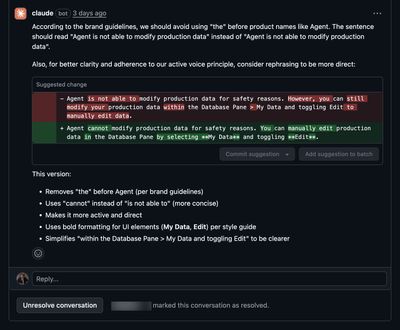
The key here is tight feedback loops: devs can make changes directly from GitHub, without having to checkout the branch.
With Mintlify's preview deploys, we can implement the suggested changes and see them live in minutes.
Couple that with background agents and you have a powerful system:
- Fire off docs from Slack
- Merge feedback on GitHub
- Deploy with a button press
You can do all of these from your phone.
Automate scaffolding and routine
Writing requires thought and attention. That's our differentiated skill.
Everything else—branches, navigation, PR setup, running checks—is undifferentiated work.
It's not the point of docs. The point of docs is to inform and educate users, not to worry about creating PRs.
Branches, navigation, PR setup, running checks...
That's 15-30 minutes before you write anything. Do that five to ten times a week and you're spending more time on scaffolding than writing.
The amazing thing about agents is that they eliminate scaffolding.
Agents can:
- Create and check out branches
- Update
docs.jsonor navigation files - Run lints and pre-commit hooks
- Push changes and write PR descriptions
- Update related files (changelogs, navigation, metadata)
- Fix formatting across files
That means we need to build the repo for agents. If we have that, we don't need to do any of that.

Again, this tightens feedback loops and improves the developer experience: contributors spend time writing, not wrestling with tooling.
Let Agents handle routine work
At Replit, changelogs are ~90% automated. We draft them from internal updates with an AI workflow. The agent has access to our brand voice, docs guidelines, MCP servers, and repo config.
Every Friday I wake up to a PR ready for review. I open the Mintlify preview, make edits, and ship. We've shipped a changelog and monthly product updates for 11 months straight.
Lack of automation is another common way docs fall by the wayside. The more we can lever AI productively, the more we can focus on writing and keeping our docs up to date.
Make contribution easy and visible
Democratization is just as much about habit-building as it is about tools.
For months, I was the only one maintaining our docs. To get the team contributing, we made the process easy and visible.
Then, I relentlessly nagged everyone. 😅
Show your work. Share Looms of your process. Train the team on workflows. Celebrate small PRs when they land.
When someone asks you to make a change, make it using background agents, then tag them in the agent's Slack thread in a not-so-passive-aggressive way.
Habits and tools that help
- Record Loom walkthroughs for new contributors
- Have an excellent
README.mdfor contributors - Make your docs the best developer experience in your company
- Build in public: show just how easy it is to contribute
- Sit down with new contributors and show them the ropes
- Host an educational session for the team
- Run background agents in public and tag relevant people
- (Tastefully) nag your team
- Be pedantic. This is one of the only times you get to nag people and be annoying. Do it.
Share your progress with the team, celebrate first-time contributors, and make the default path easy to follow.
What good docs look like
Good docs help users succeed.
At Replit, we went from "docs as an afterthought" to "docs as a product feature."
Docs are a growth lever. They're developer experience. They're the difference between users who succeed and users who churn.
Build great docs, build a great product.
Footnotes
This article is a collection of rules based on my work at Replit. For the backstory and outcomes, see Mintlify's case study and deep dive: Replit customer story and Behind Replit's Documentation Transformation. ↩
Both needle in a haystack and context rot support direct connections reducing hallucination in LLMs. ↩
Mastra does this well with their MCP server. ↩