
I frequently find myself downloading Apple emoji as images to use in my apps / projects, but I've never been able to download every emoji or variant. Even basic emoji are missing from most sites, let alone variants and more exotic ones.
So I set out to build my own system with every possible emoji.
How hard could it be?
Approach
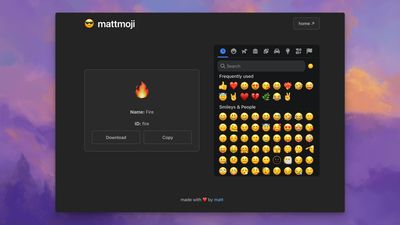
My goal: rip emoji from Apple's font file, build a web app that maps emoji picker selections to the correct image files, and serve the images from a CDN.
I'm a big Python guy, plus I found this handy extractor script, so I decided to go with a build script using uv scripts.
It seemed React had the most widespread emoji support and OSS libraries, so I used Vite and React to build the web app.
I decided to build the project locally, then push the built assets to Cloudflare Wrangler, which was the simplest way to get this project live, since my other sites already live on Cloudflare.
I was originally concerned with egress and abuse, but I've since learned that Cloudflare has seemingly free egress.
I learned of this from a Cloudflare engineer I met at a party rather than from the Cloudflare docs, which are practically unreadable. I still love you Cloudflare.
Here's a breakdown of the tools I used:
- emoji-mart: OSS for our emoji picker that supports custom data sources
- uv: for our script that rips emoji from Apple's font file and builds the app
- Vite: for our static web app
- Cloudflare: for hosting site
The problem
Apple stores emoji as PNG images inside their font files using a proprietary naming system that doesn't match Unicode standards.
I had to figure out how to pull all 3,000+ emoji PNGs from Apple's ~200MB font file and create a web interface that maps emoji picker selections to the correct image files.
Apple's internal font format
Apple embeds emoji as PNG images in the sbix table of their TrueType font file. Each emoji has an internal name that encodes modifiers:
Apple Emoji: u1F9D7.2.M decodes as:
1F9D7= Base emoji (🧗 person climbing).2= Skin tone 2 (medium-light).M= Man gender modifier
Result: 🧗🏼♂️ (person climbing, medium-light skin tone, man)
But, this isn't standard Unicode!
Standard Unicode: U+1F9D7 U+1F3FC U+200D U+2642 U+FE0F
Breaking this down:
U+1F9D7= 🧗 PERSON CLIMBING (base emoji)U+1F3FC= MEDIUM-LIGHT SKIN TONE (modifier)U+200D= ZERO WIDTH JOINER (combines sequences)U+2642= MALE SIGN (gender modifier)U+FE0F= VARIATION SELECTOR-16 (emoji presentation)
The filename becomes: 1f9d7-1f3fc-200d-2642-fe0f.png
So we need to convert Apple's internal names to Unicode filenames that work with standard emoji libraries.
Apple's Format → Unicode Sequence:
u1F9D7.2.M → 1f9d7-1f3fc-200d-2642-fe0f.png
   │   │ │      │     │     │     │     │
   │   │ └─────── ZWJ + male + variation selector
   │   └───────── skin tone 2 → 1f3fc (medium-light)
   └─────────── base emoji → 1f9d7 (person climbing)
Skin Tone Mapping:
skin_tone_codes = {
    '1': '1f3fb',  # Light skin tone
    '2': '1f3fc',  # Medium-light
    '3': '1f3fd',  # Medium
    '4': '1f3fe',  # Medium-dark
    '5': '1f3ff'   # Dark skin tone
}
Gender Modifier Sequences:
if gender == 'W':  # Woman
    parts.extend(['200d', '2640', 'fe0f'])
elif gender == 'M':  # Man
    parts.extend(['200d', '2642', 'fe0f'])
My extraction script processes Apple's font file and outputs all emoji with standardized Unicode filenames that map to our emoji-mart library.
Practically, that means I can use the emoji-mart library to display the emoji in our web app by mapping the Unicode filename to the correct image file path.
Then, when a user clicks "download" on an emoji, the app will download the correct image file from the CDN.
Unicode edge cases
Unfortunately, there are some edge cases.
For example, emoji-mart returns 2764-fe0f (heart + variation selector) but Apple's extraction creates 2764.png (stripped). This breaks downloads why this happens is beyond me.
Since the issue seemed isolated to the heart emoji, I added a simple fallback system that tries multiple URL patterns:
// Try: /emoji/2764-fe0f.png (fails)
// Try: /emoji/2764.png (succeeds)
It seemed to work in every case I tested.
Another issue is that family emoji use Zero Width Joiner (ZWJ) sequences:
👨👩👧👦 = 1F468-200D-1F469-200D-1F467-200D-1F466
(man + ZWJ + woman + ZWJ + girl + ZWJ + boy)Apple stores these as single glyphs, but they must be reconstructed as proper ZWJ sequences to match emoji-mart's identifiers.
Build system challenges
I wrote the build script in Python, but the web app is in TypeScript.
I spent a long time struggling to find a build environment that would work with both uv and pnpm, but ended up building locally for simplicity. Using Cloudflare Wrangler, I build the project locally, then push the built assets to Cloudflare.
This worked surprisingly well with Cloudflare's asset caching.
Mapping emoji
The web interface uses emoji-mart for selection, which returns Unicode identifiers that must map to extracted filenames:
// User clicks 🧗🏼♂️ in picker
emojiData.unified = "1f9d7-1f3fc-200d-2642-fe0f"
// App constructs URL
imageUrl = `/emoji/${emojiData.unified}.png`
// → /emoji/1f9d7-1f3fc-200d-2642-fe0f.pngThe extraction process ensures extracted filenames match emoji-mart's unified format exactly.
Fallback URL strategy
Some emoji have Unicode variation mismatches. The app tries multiple URL patterns:
const generateFallbackUrls = (unified: string) => [
  `/emoji/${unified}.png`,                    // Try exact match first
  `/emoji/${withoutModifiers.join('-')}.png`, // Try without fe0f/200d
  `/emoji/${parts[0]}.png`                    // Try base emoji only
];
This handles edge cases like the heart emoji where emoji-mart includes variation selectors but Apple's extraction strips them.
Lessons learned
I learned a lot about the Unicode standard, font formats, and emoji parsing.
I also learned that sometimes simplicity wins. For example, the dumbest retry logic worked well here.
Similarly, building locally and pushing to Wrangler didn't feel elegant but it was the fastest way to go live and it got the job done.
This was a fun project that I haven't seen replicated elsewhere. I'd be interested to see if anyone else has tried to build a similar system. Until then, check it out: emoji.mattpalmer.io!